 Castellating shapes
|
<< Click to Display Table of Contents >> Navigation: »No topics above this level«
|
This button on the top toolbar shows a pop-up dialog box where you can add a castellated edge ( like the battlements of a castle) to a selected shape. It will be disabled until you select a suitable shape. i.e. a simple path with more that 2 points otherwise the castellation button will be disabled.
It does not work with the following:
ogrouped shapes
ocompound paths
otext
ostraight lines
Shapes with smooth curved edges
This works best with shapes like the ones shown below, although shapes with a sharp re-entrant angle, like this  may give unreliable results.
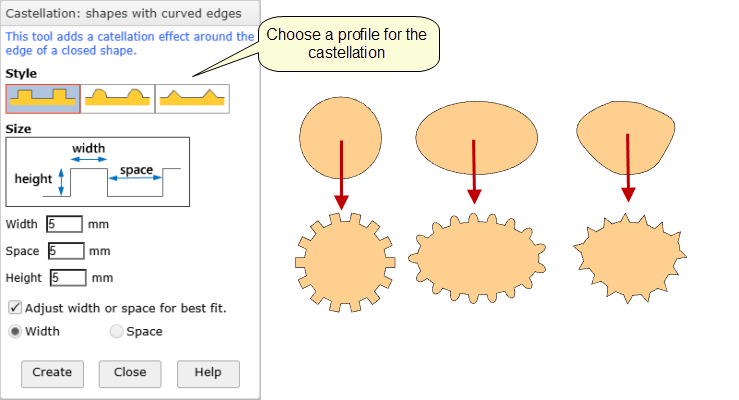
The values you choose for the width and/ space may not fit exactly into the path, so if check box is ticked you can choose to modify the width or the spacing for a best fit.
Once you click the "Create" button the settings are applied to the selected shape and the caption on the button changes to "Update". This means that if you change the settings, the changes are applied to the current shape.
When the dialog is closed, you can still edit the castellated shape by double clicking. This will re- show the dialog so you can make any changes.
Shapes with straight edges (polygons)
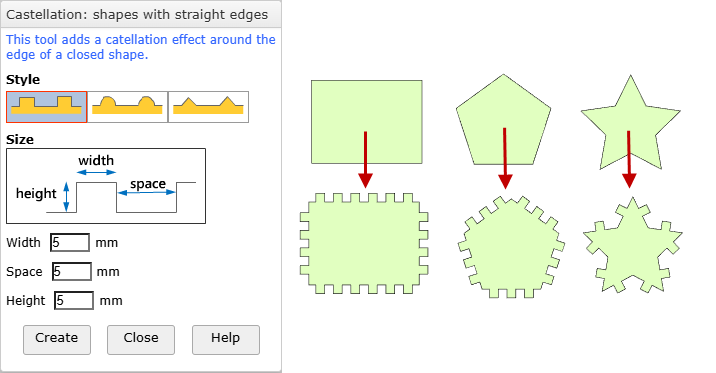
In this case the castellation is done in a slightly different way.. Instead of fitting to the whole path, the castellation is fitted to each edge in turn. Therefore there is no option to adjust the width or spacing Otherwise the behaviour is the same.
Shapes with both curved and straight edges
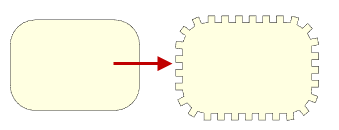
A round rectangle is an example. This may give a satisfactory result. However, depending on the size of the round rectangle and the settings in the pop-up dialog, the result may not be symmetrical.